What Is Pika Lip Sync / Pikaformance?
Pikaformance is Pika’s dedicated audio-driven lip-sync and performance model. Instead of just generating mute AI video, it:
-
Takes a single image or avatar
-
Takes audio (voiceover, song, dialogue, SFX etc.)
-
Generates a short video where the character talks or sings, with lips, eyes, and facial muscles moving in time with the audio.
On the official Pika site, it’s described as:
“Hyper-real expressions, synced to any sound make your images sing, speak, rap, bark, and more with near real time generation speed.”
So “Pika Lip Sync” = using Pikaformance to create talking images/avatars.
Where Can You Use Pika Lip Sync?
1. Pika Web App (Official)
On pika.art, you can sign in and access Pikaformance directly from the web interface, no install needed.
You typically:
-
Sign in (Google / Facebook / Discord / email)
-
Choose the Pikaformance / lip sync option
-
Upload an image or simple portrait
-
Upload audio
-
Generate and download the talking-head clip
2. Partner Platforms & Integrations
Some platforms expose Pika’s Lip Sync / Lipsync Video mode as a model you can call from their UI, for example GoEnhance AI, which lists “Lipsync Video – transform any video seamless lip syncing made easy” using Pika under the hood.
There have also been mobile/iOS experiences where users mention lip sync features being available in app builds.
How Pika Lip Sync Works (Conceptual)
Under the hood, Pikaformance behaves like other modern lip-sync / talking-head models:
-
Face analysis
-
Detects the face in your input image/video
-
Maps key facial landmarks (mouth, eyes, jawline, etc.)
-
-
Audio analysis
-
Breaks audio into phonemes/visemes (sound units that correspond to mouth shapes)
-
Extracts rhythm, timing, and emphasis
-
-
Facial performance generation
-
Generates a sequence of facial poses and expressions that match the sound
-
Animates lips, jaw, eyes, brows, and sometimes head tilt for a more “alive” feeling
-
-
Rendering to video
-
Composites the animated face into a short video (typically a few seconds to ~30 seconds)
-
Outputs a ready-to-share clip
-
Because it’s audio-driven, timing is tied tightly to the sound, not to a text prompt.
Pika Lip Sync Pricing & Credits (Pikaformance)
Pika uses a credit-based system for all video tools, including Pikaformance.
On the official pricing page:
-
Pikaformance is listed separately with:
-
Quality: 720p
-
Audio duration: up to 10s (Free) and up to 30s (Paid)
-
Cost: 3 credits per second of audio (both free-tier and paid plans)
-
In practice, that means:
-
A 10-second talking clip ≈ 30 credits
-
A 30-second talking clip ≈ 90 credits
Your monthly plan (Free / Standard / Pro / etc.) gives you a pool of credits, and Pikaformance draws from that pool.
Tip: Use shorter audio for drafts, then spend credits on a polished final version when you’re happy with the timing and performance.
Step-by-Step: Create a Pika Lip Sync from an Image
Here’s a generic workflow you’d follow in the web app (the exact UI labels may change, but the logic stays the same):
1. Prepare your image
Best results come from:
-
A clear, front-facing or 3/4 portrait
-
Good lighting (no heavy shadows across the mouth)
-
Face not cropped too tightly at the chin/forehead
-
No hands, mics, or big objects covering the mouth
2. Prepare your audio
Use:
-
Clean, high-quality audio (no heavy background noise)
-
Normal speaking volume (not super quiet)
-
Consistent mic distance
Formats are usually standard (like .wav/.mp3); check the UI for specifics.
3. Upload & configure
In the Pika interface / Pikaformance area:
-
Upload the image (your character/avatar/portrait).
-
Upload audio (voiceover, script read, song, etc.).
-
Choose any options available (e.g., length, aspect ratio, maybe mild style options depending on the build).
4. Generate and review
-
Click Generate to create a preview.
-
Watch for:
-
Lip sync accuracy (do the mouth shapes match syllables?)
-
Eye blinks and head motion (too much or too little?)
-
Any weird glitches (teeth, jaw popping, etc.)
-
5. Refine if needed
If something feels off:
-
Re-record audio more clearly
-
Try a different image (better framing or lighting)
-
Keep the face more neutral in the input (extreme expressions can cause artifacts)
A Yahoo test review describes uploading an image/video, pairing it to sound, and Pika animating the lips in time with the dialogue—showing this basic workflow in real use.
Step-by-Step: Lip Sync an Existing Video
Some flows let you upload a short video and pair it with audio:
-
Upload your video clip (e.g., a figure or character looking at camera).
-
Upload your target audio.
-
Pika animates the lips (and sometimes expression) to fit the new sound, keeping the base motion from your clip.
This is useful for:
-
Re-voicing content
-
Dubbing short clips
-
Making toys/figures “talk” on camera (as some creators have shown off in demos).
Pika Lip Sync support: versions, models, and tools
Supported model
-
Pikaformance — this is Pika’s lip-sync / audio-driven performance model. Pika says it’s “available on web” and syncs expressions “to any sound.”
Supported tool / mode
-
Pikaformance (Lip Sync / Talking-head) — the dedicated tool you use to create lip-synced videos (image + audio → talking video). On the pricing table it’s listed as its own feature with 720p output.
Plan support (Free vs Paid limits)
From Pika’s official pricing table:
-
Free plan: Pikaformance supports audio up to 10 seconds at 3 credits/second.
-
Paid plans: Pikaformance supports audio up to 30 seconds at 3 credits/second.
Related “versions” (platform model versions you’ll see in Pika)
These are Pika’s main video generation versions shown on the pricing page (not the lip-sync model name), but they’re part of the same platform:
-
Pika 2.5 (used for Text-to-Video & Image-to-Video; also Pikaframes)
-
Pika 2.2 (used for Pikascenes)
-
Turbo / Pro models (used for tools like Pikadditions, Pikaswaps, Pikatwists)
Key point: Lip sync is specifically Pikaformance (its own model/tool), while 2.5 / 2.2 / Turbo / Pro are the broader video generation/editing models shown for other tools.
Best Use Cases for Pika Lip Sync
1. Talking Avatars & VTuber Clips
-
Static character art → talking persona
-
Anime avatar that speaks your script
-
VTuber-style shorts for TikTok, Reels, YouTube
2. Short Skits & Memes
-
Make characters sing or rap to trending audio
-
Turn still images into meme reactions with voiceovers
3. Product & Brand Spokes-avatars
-
“Mascot” characters that introduce features or promos
-
Event/invite videos where a character talks to camera
4. Education & Explainers
-
Cartoon teacher explaining a topic
-
Language-learning mini clips with synced speech
5. Simple Dubbing / Localization
-
Replacing speech with a new language/voice for short segments (long-form pro dubbing usually needs more advanced tools, but Pika works well for short clips).
Tips for Better Lip Sync Results
1. Choose the right image
-
Face centered
-
Good contrast between lips and skin
-
Not ultra-wide or extreme fish-eye
2. Use clean audio
-
Record in a quiet room
-
Avoid overly compressed social audio (heavy artifacts)
-
Don’t overdo background music under the voice
3. Keep lengths reasonable
-
Shorter clips (5–20 seconds) generally look more natural and are cheaper in credits.
4. Avoid “trick” poses
-
Extreme side profiles
-
Huge open-mouthed smiles in the base image
-
Faces partly hidden by hair, hands, or props
5. Use atmosphere to your advantage
If you integrate the talking head into an edit, you can use:
-
Slight film grain
-
Soft glow/bloom
-
Light background blur
to help hide tiny artifacts and make it feel more intentional.
Limitations & Things to Watch Out For
Even with a strong model like Pikaformance, there are limits:
-
Extreme accuracy for every phoneme is not guaranteed, especially on fast, complex speech or rap; it aims for believable, not frame-perfect.
-
Profile and extreme angles can break mapping. Frontal or near-frontal is best.
-
Long audio (close to 30s) can slowly drift or lose micro-detail compared to short bursts.
-
It is not a full professional dub/localization pipeline like high-end studio tools (e.g. LipDub, Sync etc.), which are built for full movie-grade dubbing.
10 Pika Lip Sync Setups
1) Realistic Talking Head (Clean & Natural)
Best image: Front-facing portrait, soft daylight, shoulders visible
Audio: Calm voiceover, normal speed
Paste style line:
“Natural lip sync, subtle facial expressions, steady head, realistic skin texture, soft daylight, clean edges, minimal flicker.”
Tip: Avoid big smiles in the base image.
2) Travel Narrator Avatar (Reels/TikTok)
Best image: You/character with travel background (not too busy), face clear
Audio: Excited but clear narration (8–15s)
Paste style line:
“Friendly travel narrator, warm cinematic color grade, subtle head movement, stable face, smooth consistency, minimal flicker.”
Tip: Add captions in CapCut after export.
3) Anime VTuber Lip Sync
Best image: Anime portrait, clean outlines, mouth visible
Audio: Bright voice, slightly slower than normal
Paste style line:
“Anime cel-shaded style, crisp outlines, smooth shading, stable face, clean mouth shapes, minimal flicker.”
Tip: Use simple backgrounds for less jitter.
4) Brand Mascot Spokesperson
Best image: Mascot/character centered, neutral expression, plain background
Audio: Short promo script (10–20s)
Paste style line:
“Brand mascot speaking clearly, clean studio lighting, smooth mouth movement, stable features, premium commercial look.”
Tip: Keep the script punchy—shorter clips look more convincing.
5) Comedy Meme “Talking Photo”
Best image: Funny face/photo, close-up
Audio: Comedic voiceover, exaggerated tone
Paste style line:
“Expressive talking photo, comedic timing, exaggerated eyebrows, smooth lip sync, stable face, minimal distortion.”
Tip: If it gets too weird, reduce exaggeration and try again.
6) Singing Hook (Chorus Clip)
Best image: Portrait with open/relaxed mouth (not wide), good lighting
Audio: 8–12s chorus (clean, loud, no clipping)
Paste style line:
“Performance lip sync, expressive singing face, smooth mouth shapes, subtle head sway, cinematic lighting, clean edges.”
Tip: Singing is harder—do more variations (3–6).
7) Podcast/Radio Host Style
Best image: Portrait + “studio vibe” background (simple)
Audio: Confident, steady pacing
Paste style line:
“Podcast host speaking, calm confident expression, subtle blink, stable jawline, soft studio lighting, minimal flicker.”
Tip: Avoid fast speech; it improves mouth accuracy.
8) Customer Support Explainer (App Tutorial)
Best image: Friendly headshot, plain background
Audio: Step-by-step instructions (10–20s)
Paste style line:
“Clear explainer delivery, friendly smile, steady face, crisp details, clean lighting, smooth consistency.”
Tip: Split longer tutorials into multiple 10–15s clips.
9) Cinematic Monologue (Film Look)
Best image: Moody portrait, side-lit but mouth still visible
Audio: Dramatic voice, slower pace
Paste style line:
“Cinematic monologue, dramatic soft lighting, shallow depth of field, subtle film grain, stable face, clean edges.”
Tip: Don’t overdo darkness—lip edges need to be visible.
10) Kids-Style Cartoon Voice (Safe, Playful)
Best image: Cute cartoon character, big clear mouth area
Audio: Playful upbeat voice, short lines
Paste style line:
“Cute cartoon character speaking, bright soft lighting, clean outlines, smooth mouth movement, minimal flicker.”
Tip: Big simple shapes (eyes/mouth) work best for cartoons.
Lip Sync Feature for AI-Generated Characters to Speak
Pika Labs has recently launched a revolutionary new tool that is changing the landscape of animation: Pika Lip Syncing. This innovative technology automates the process of syncing lips to footage, making animated conversations and scenes more lifelike and impactful than ever before. Imagine bringing a scene to life with perfect lip synchronization, where phrases like “Tomorrow, we attack the enemy castle at dawn,” resonate with newfound realism in animated projects.
Beyond Cartoons: A Tool for Photorealistic Renderings
Pika Lip Syncing isn't confined to the world of cartoons; it excels in creating photorealistic scenes as well. Consider a breakup scene rendered with such precision that the words “We should see other people,” are imbued with a depth of emotional weight previously hard to achieve. While the tool isn't without its limitations, it stands as the most accessible and effective solution for creators looking to enhance their projects with accurate lip movements, surpassing older, more cumbersome methods that often resulted in lower-quality outputs.
A Leap Over Traditional Methods
Before the advent of Pika Lip Syncing, 3D animators and creators had to rely on less efficient tools like Wave to Lip, which were not only difficult to use but also fell short in delivering high-quality results. Alternatives like DeepArt provided static solutions that struggled with dynamic camera movements, a gap now filled by Pika Labs’ dynamic and flexible tool, perfect for bringing more complex, cinematic shots to life.
Ease of Use and Integration
Getting started with Pika Lip Syncing is remarkably straightforward. The tool is designed to be user-friendly, whether you're working with static images or video footage, with the latter allowing for longer and more detailed synchronization. Pika Labs has facilitated this integration by providing assets for practice, including an engaging eight-second animation of a king, demonstrating the tool's potential right out of the gate. Additionally, a newly introduced lip sync button simplifies the process further, and the integration of the Eleven Labs API enables the generation of voiceovers directly within the platform.
Showcasing the Tool's Capabilities
Despite its limitations, Pika Lip Syncing particularly shines in the realm of 3D animation. An example of its capabilities can be seen in a project where a MidJourney v6 image, prompted for a surprised expression, was perfectly matched with the audio line “I don’t think that was chocolate.” This seamless integration of audio and visual elements illustrates the tool’s proficiency in enhancing storytelling through realistic lip synchronization.
Enhancing Video Quality
To maximize the render quality of projects using Pika Lip Syncing, tools like Topaz Video are recommended. Topaz Video is known for its ability to enhance the resolution of AI-generated videos, offering simple drag-and-drop functionality along with adjustable resolution settings to achieve the desired quality, from full HD to 4K. Selecting the right AI model, such as the Iris model, is key to improving details in areas like lips, ensuring the final product is as lifelike as possible.
Pika Lip Syncing represents a significant advancement in the field of animation and video production, providing creators with a powerful tool to add realism and emotional depth to their projects. As Pika Labs continues to innovate, the future of animated and photorealistic video creation looks brighter and more immersive than ever.
How to Use "Pika Lip Syncing" for Enhanced Video Animation
"Pika Lip Syncing" is a revolutionary tool from Pika Labs that significantly simplifies the process of syncing lips to footage, whether for animated cartoons or photorealistic videos. Here’s a step-by-step guide on how to use this groundbreaking feature to bring your characters to life with perfectly synchronized lip movements.
- Step 1: Prepare Your Footage
- Step 2: Access Pika Lip Syncing
- Step 3: Upload Your Footage
- Step 4: Sync Lips to Audio
- Step 5: Fine-Tune and Render
- Step 6: Enhance Your Video (Optional)
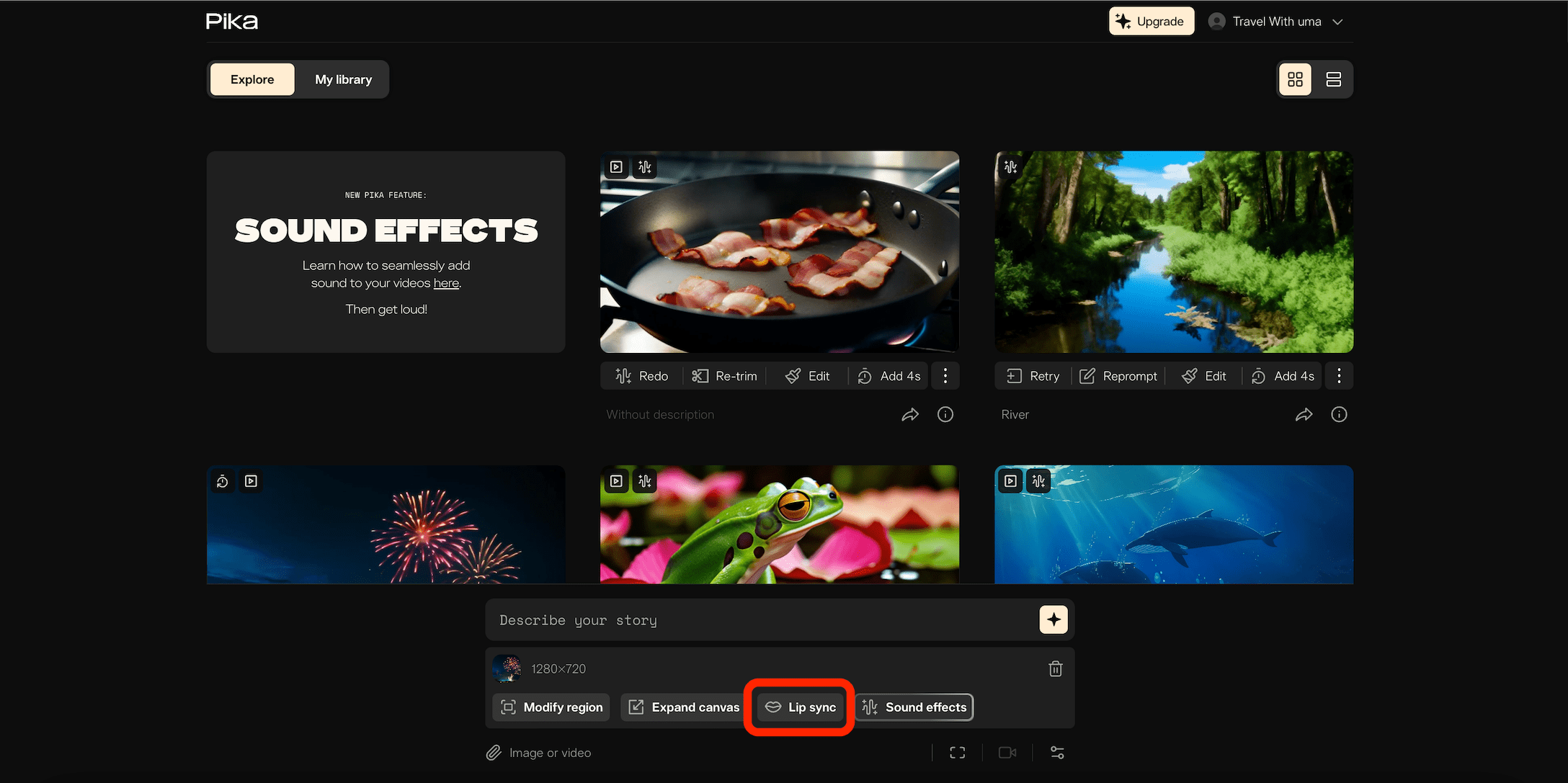
Image credit: Pika.art
Before you start, ensure you have the footage or image you want to animate. "Pika Lip Syncing" works with both video clips and still images, but using a video allows for a more detailed and extended synchronization.
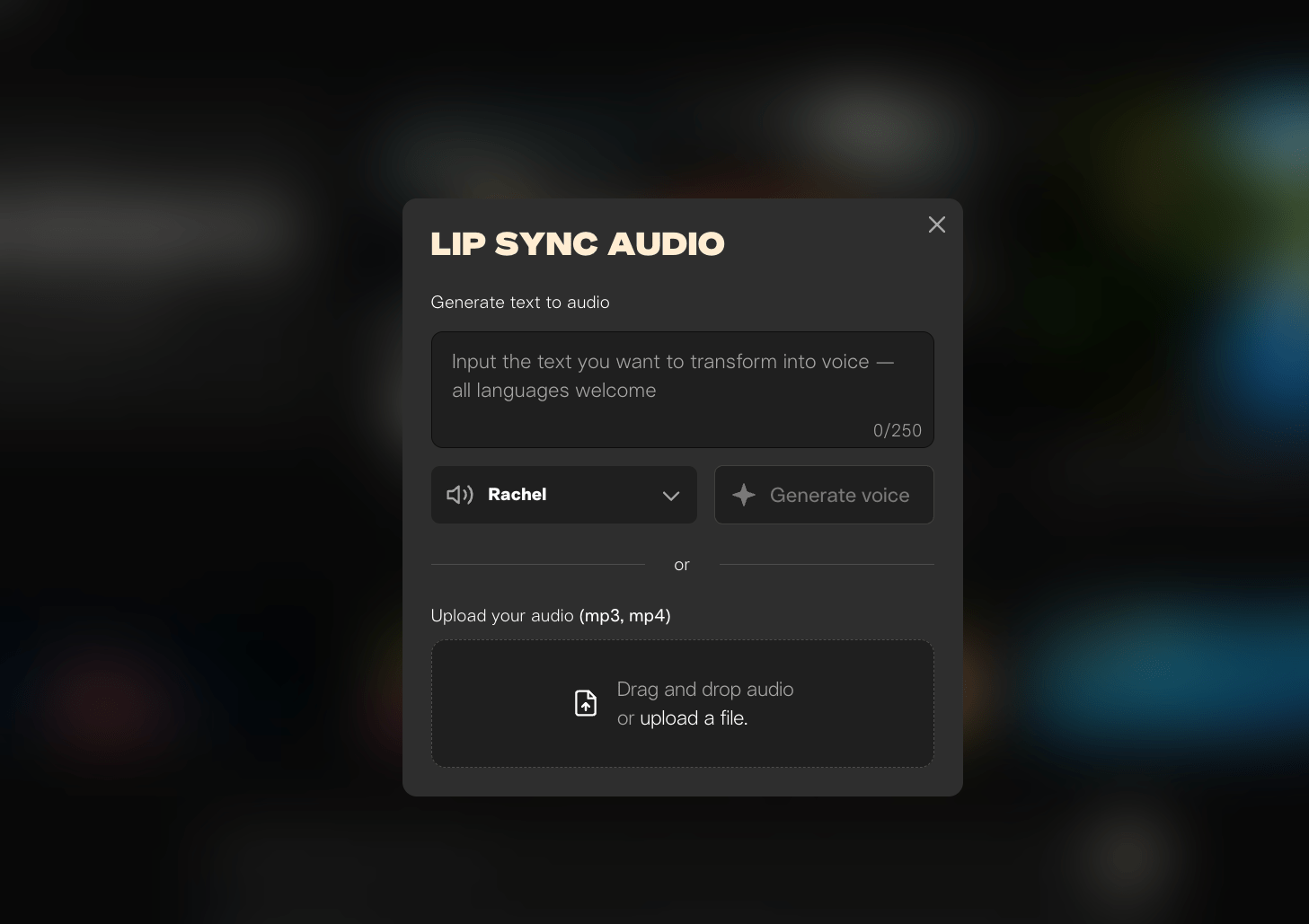
Image credit: Pika.art
Navigate to Pika Labs’ platform where "Pika Lip Syncing" is hosted. Look for a guide or a link under the video on their website to help you get started. This tool is designed to be user-friendly, making it accessible to both professionals and beginners.
Once you’re in the "Pika Lip Syncing" interface, upload the footage or image you’ve prepared. The platform may offer assets for practice, such as an 8-second animation of a king, to help you familiarize yourself with the tool.
After uploading, you'll need an audio file that your character will LipSync AI to. If you don't have an audio clip ready, Pika Labs integrates with the Eleven Labs API, allowing you to generate voiceovers directly within the platform. Simply type in the dialogue or upload your audio file, and then activate the "Pika Lip Syncing" feature.
With your audio and video ready, hit the lip sync button to start the process. The tool automatically syncs the character’s lips with the spoken words in the audio clip. While the tool works impressively well, it’s always a good idea to review the synced footage for any adjustments that may be needed.
For an added touch of professionalism, consider using additional software like Topaz Video to enhance the resolution of your rendered video. This is particularly useful for AI-generated videos that might need a resolution boost to achieve full HD or 4K quality. Simply drag and drop your video into Topaz Video and adjust the resolution settings as needed.
Tips for Success:
- Maximize Render Quality: Use tools like Topaz Video to refine your video's resolution and ensure your animations look sharp and clear.
- Choose the Right AI Model: For enhancing specific details such as lips in low-resolution footage, selecting an appropriate AI model like Iris can improve the outcome significantly.
- Practice with Provided Assets: If you’re new to "Pika Lip Syncing," take advantage of any practice assets provided by Pika Labs to get a feel for the tool before working on your project.
"Pika Lip Syncing" has opened new doors for creators by making lip synchronization more accessible and less time-consuming. By following these steps and tips, you can create engaging, lifelike animations that captivate your audience.
Lip Sync Animation
Lip sync animation is a technique in animation that aligns a character's mouth movements with spoken dialogue, creating the illusion of realistic speech. This process brings animated characters to life, making them appear as if they’re genuinely speaking, which greatly enhances viewer engagement and realism.
Definition and Importance
Lip syncing involves matching mouth movements precisely to spoken sounds, which requires an understanding of speech elements, such as phonemes—the distinct sounds in language. By accurately syncing dialogue, animators can make characters appear more relatable and believable, adding depth to animated content.
Techniques Used in Lip Sync Animation
- Reference Footage: Animators often record voice actors’ mouth movements as a guide to accurately replicate speech in animation.
- Phoneme Charts: These charts visually represent sounds in a language, helping animators shape characters’ mouths for each sound.
- Keyframes: Setting keyframes for specific mouth shapes corresponding to phonemes helps ensure smooth transitions between sounds.
Key Factors for Successful Lip Sync
- Timing: Accurate timing of mouth movements with audio is essential to avoid disjointed or unrealistic speech.
- Body Language: Incorporating gestures and facial expressions alongside lip sync makes the character’s speech more believable.
- Practice and Reference: Animators often observe their own speech movements or study recordings for realistic replication.
Software and Tools
Modern software like Adobe Character Animator leverages AI to automate lip sync by assigning mouth shapes based on audio input, making the process faster and more efficient than traditional methods.
Lip Sync Animation 3D
Lip sync animation in 3D involves aligning a 3D character's mouth movements with spoken dialogue to create lifelike, expressive communication. This process enhances the realism and emotional impact of 3D animations, making characters appear to speak naturally and engage viewers more effectively.
Key Components of 3D Lip Sync Animation
- Phoneme Mapping: 3D lip sync begins by breaking down dialogue into phonemes, the distinct sounds within speech. Each phoneme corresponds to specific mouth shapes that animators create for accuracy in synchronization, forming the basis for realistic speech.
- Model Preparation and Rigging: A detailed 3D model with a flexible facial rig is essential. Rigging sets up a "skeleton" within the character's face, allowing animators to manipulate facial features. This setup provides the control needed to achieve nuanced expressions and accurate mouth movements.
- Animation Techniques:
- Motion Capture: Real-time mouth movements from actors can be captured and applied directly to the 3D character, providing realistic lip sync results.
- Manual Keyframing: When motion capture is impractical, animators can manually place keyframes at pivotal moments in the dialogue. This technique requires precision to ensure smooth transitions and lifelike movement.
- Software Tools
- Autodesk Maya: An industry favorite, Maya provides advanced tools for lip sync through blend shapes and robust rigging capabilities.
- Blender: An open-source tool that offers both 2D and 3D animation support, including effective lip sync features.
- Cinema 4D: Known for its user-friendly interface, Cinema 4D supports detailed facial animations and offers tools for achieving high-quality lip sync.
Lip Syncing
Lip syncing, short for lip synchronization, is the process of aligning a person’s lip movements with pre-recorded spoken or sung audio to create the illusion that they’re speaking or singing in real-time. This technique is widely used in live performances, film production, animation, and video games to make characters or performers appear as if they’re delivering the audio on the spot.
Key Aspects of Lip Syncing
Definition: Lip syncing involves matching a person’s lip movements with audio, applicable for both speaking and singing. It’s used to enhance realism and performance quality across various media.
Applications
- Live Performances: Singers and performers sometimes lip sync during concerts or TV appearances, especially when complex choreography makes live singing challenging.
- Film and Animation: Essential in dubbing and animation, lip syncing helps make foreign-language films accessible and makes animated characters appear to speak naturally.
- Video Games: Used to create immersive experiences, lip syncing allows video game characters to communicate convincingly with players.
Techniques
- Phoneme Mapping: This technique involves breaking down speech into phonemes (basic sound units) and creating mouth shapes for each sound, ensuring natural movement.
- Reference Footage: Animators use video recordings of voice actors to accurately replicate mouth movements.
- AI Tools: Advanced AI-powered tools now automate the lip syncing process, allowing faster, more precise synchronization for animations and videos.
3D Lip Sync Animation for YouTube: Enhancing Realism in Animated Content
Creating lifelike, engaging animated characters for YouTube is made more captivating through 3D lip sync animation. This technique involves synchronizing a character’s mouth movements with audio, typically dialogue or music, to make the character appear to be speaking or singing naturally. In the competitive landscape of YouTube content, 3D lip sync animation brings a layer of realism and emotional depth that significantly enhances viewer engagement.
Overview of 3D Lip Sync Animation
3D lip sync animation on YouTube involves key processes:
- Character Modeling: Detailed 3D character models with defined facial features and geometry are the foundation of realistic lip sync animation. Each character’s facial structure is crafted to enable smooth, lifelike movements.
- Rigging: This process sets up a virtual skeletal framework that controls the character's mouth and facial expressions, allowing the character to mimic natural human speech and emotions.
- Phoneme Mapping: Audio is broken down into phonemes, which represent distinct sounds, and animators create specific mouth shapes to correspond with these sounds. This mapping ensures that lip movements align accurately with the audio.
Tools and Software for 3D Lip Sync Animation on YouTube
Various tools have made it easier for creators to produce high-quality lip sync animations:
- Pixbim Lip Sync AI: Known for its simplicity, Pixbim Lip Sync AI automates lip sync by allowing users to upload audio along with photos or videos. It processes content locally on devices, enhancing privacy and security, which is particularly appealing to beginners due to its ease of use.
- Kapwing: This online platform uses AI to synchronize audio with mouth movements across over 30 languages, making it ideal for content creators aiming to reach global audiences. Users can upload videos and receive automatic lip sync results, simplifying the editing process.
- Virbo Lip Sync AI: This tool applies advanced AI to sync audio with lip movements in videos, making it a practical choice for educational, marketing, and entertainment videos where accurate dialogue syncing is essential.
- CreateStudio: CreateStudio enables users to build custom 3D characters and animate them with lip sync features, ideal for adding voiceovers, automatic subtitles, and various expressions. This tool is suitable for creators who want more control over character creation and customization.
Enhancing Realism in 3D Lip Sync Animation
Accurate lip sync in 3D animation significantly boosts the realism of animated characters by ensuring that mouth movements and audio are in perfect harmony. This attention to detail makes characters appear more lifelike, helping to convey emotions and narratives more effectively. Techniques such as motion capture are often used to enhance realism further by capturing actual actor performances and transferring them onto animated characters. This process helps bridge the gap between human expression and animation, making the content even more engaging.
Why Lip Sync Animation Matters on YouTube
In the fast-paced world of YouTube, content needs to be both visually engaging and authentic to retain viewer attention. High-quality lip sync animation helps build a connection between characters and viewers, making animated stories more relatable and immersive. This is particularly useful for creators in fields like education, entertainment, and marketing, where the effectiveness of a message relies on clear, expressive communication.
Mastering Lip Sync with Pika Labs: A Step-by-Step Guide
Master the art of lip-syncing with Pika Labs using this step-by-step guide. Whether you're working with images or videos, Pika Labs' AI-powered tool makes it easy to synchronize lip movements with any audio. Learn how to upload media, generate or add voiceovers, fine-tune synchronization, and download high-quality, realistic lip-synced animations. Perfect for content creators, animators, and digital artists looking to enhance their videos effortlessly. Follow our guide to bring your characters to life with accurate and expressive lip movements!
Pika AI Lip Sync Video
Pika Labs has introduced an innovative Lip Sync feature that automates the synchronization of lip movements with audio in videos and images. This tool is designed to enhance the realism of animated characters, making them appear as though they are genuinely speaking.
Key Features
- Automatic Lip Synchronization: Pika Labs' Lip Sync feature analyzes the provided audio and adjusts the character's lip movements to match the speech, eliminating the need for manual synchronization.
- Integration with ElevenLabs: The platform integrates with ElevenLabs, allowing users to generate voiceovers directly within Pika Labs, streamlining the creation process.
- User-Friendly Interface: Designed for ease of use, the tool enables users to upload their media, add audio, and generate lip-synced videos with minimal effort.
How to Use Pika Labs' Lip Sync Feature
- Access the Platform: Visit Pika Labs' website and sign in using your Google or Discord account.
- Upload Media: Choose the image or video you wish to animate and upload it to the platform.
- Add Audio: Upload a pre-recorded audio file or use the integrated ElevenLabs feature to generate a voiceover.
- Generate Lip Sync: Click the "Generate" button to initiate the lip-syncing process.
- Review and Download: Once the process is complete, review the video to ensure satisfaction, then download the final product.
AI Lip Sync: Transforming Video Content with Realistic Audio Synchronization
AI lip sync technology uses artificial intelligence to synchronize lip movements in video with audio tracks, creating a realistic visual experience where the speaker appears to be saying the exact words in the audio. This innovative technology has revolutionized content creation by enabling accurate dubbing, video translation, and customizable voiceovers, making it a valuable tool across industries from entertainment to corporate communications.
Key Features of AI Lip Sync
- Realistic Synchronization: AI lip sync tools analyze both video and audio, precisely matching lip movements to spoken words to create a natural appearance. This accuracy ensures that viewers experience seamless audio-visual alignment, a significant improvement over traditional dubbing methods.
- Video Translation: AI lip sync is especially valuable for video translation, allowing creators to localize content for multiple languages. Tools like LipDub AI can synchronize new audio tracks in various languages while preserving the speaker’s original expressions and tone, enabling global reach without reshooting the video.
- Dialogue Replacement: AI lip sync technology allows for easy dialogue replacement, which is useful for updating marketing, educational, or informational content. Creators can replace audio without reshooting scenes, saving both time and resources.
- Multi-Speaker Support: Advanced platforms like Vozo can handle multi-speaker scenarios within the same video, accurately assigning audio to each person on screen. This capability makes it ideal for complex content such as interviews or panel discussions.
- Custom Voice Options: Some AI lip sync tools, like Gooey.AI, offer customizable voice models, allowing users to choose from pre-existing voices or upload their own recordings. This personalization adds a unique touch to content, making it feel tailored and authentic.
- Broad Language Support: Many AI lip sync platforms support multiple languages. For instance, LipDub AI supports over 40 languages, giving creators the flexibility to produce content for audiences worldwide without language barriers.
- Cost and Time Efficiency: AI lip sync significantly reduces the time and costs associated with traditional dubbing, where extensive manual work is required to match audio with lip movements. Automated synchronization enables faster turnaround times, allowing creators to focus on other production aspects.
Popular AI Lip Sync Tools
- LipDub AI Known for adding new audio tracks to videos with precise lip synchronization, offering video translation and dialogue replacement capabilities.
- SYNC.AI by Emotech Provides natural lip and face sync animations, compatible with various character rigs for enhanced realism.
- Vozo An online platform for creating lip-synced videos that can handle multi-speaker scenarios, making it suitable for interviews or discussions.
- Magic Hour A free online tool for basic lip sync, allowing users to upload videos and sync lip movements with audio.
- Gooey.AI Offers realistic lip sync from any audio file, with customizable voice options to match the video’s tone and content.
Applications of AI Lip Sync
- Marketing and Advertising: Brands use AI lip sync to localize ads, making them feel native to each market. It adds an authentic touch to marketing messages, building trust with local audiences.
- Educational Content: AI lip sync enables educational institutions to translate and localize learning materials for students in different regions. This approach ensures content is accessible and culturally relevant.
- Entertainment Industry: In movies and TV shows, AI lip sync improves the quality of dubbed content by ensuring that lip movements match dubbed audio, enhancing the viewing experience for international audiences.
- Corporate Communications: For internal training videos or executive messages, AI lip sync allows companies to update audio content without reshooting videos, making it a cost-effective option for corporate messaging.
Pika Lip Sync vs other AI Lip Sync tools
| Tool | Best at | Input | Output style | Control level | Pricing style | Notes |
|---|---|---|---|---|---|---|
| Pika Lip Sync (Pikaformance) | Fast talking-image clips with expressive face animation | Portrait image + audio | Short talking-head style, social-friendly | Medium (simple workflow) | Credits per second: 3 credits/sec; up to 10s free, 30s paid shown | Pika’s pricing page explicitly lists Pikaformance at 720p and 3 credits/sec. |
| Runway Lip Sync | Lip-syncing photo or video, including multiple faces in dialogue | Photo/video + uploaded audio or TTS | Creator/pro workflow | High | Subscription + credits (plan-based) | Runway docs: Lip Sync supports uploaded audio or text-to-speech and multiple faces. |
| HeyGen Lip Sync | Marketing/education “talking avatar” videos (avatars or your footage) | Script/audio + avatar or footage | Corporate-ready avatar video | High (avatar + voice options) | Freemium → paid plans | HeyGen markets a lip-sync tool that turns text/audio into talking avatar videos; also offers photo-to-avatar style products. |
| D-ID | “Talking photo” avatars for training/marketing | Photo/avatar + script/audio | Studio-style presenter videos | Medium–High | Subscription tiers + API plans | D-ID positions “perfectly lip-synced avatars” and has clear Studio/ API pricing pages. |
| LipSync.video (specialized) | Straightforward lip-sync generation with credit math | Video/avatar + audio | Focused lip-sync output | Medium | Credits per second (varies by model) | Their pricing explains credits-per-second and that advanced models can cost more per second. |
FAQs for Pika Lip Syncing
What is Pika Lip Syncing?
Pika Lip Syncing is an advanced feature offered by Pika Labs that automatically synchronizes lip movements in videos or images with corresponding audio files. This tool is designed to animate characters' mouths to match spoken words, enhancing the realism and engagement of the content.
How does Pika Lip Syncing work?
The tool utilizes AI algorithms to analyze the audio clip's waveform and text transcript, then generates accurate lip movements on the character in the video or image. It adjusts the timing and shape of the lips to match the spoken words seamlessly.
Can I use Pika Lip Syncing with any video or image?
Pika Lip Syncing works best with clear, front-facing images or videos of characters where the mouth area is visible and not obscured. The tool is designed to handle a variety of characters, including animated figures and photorealistic human representations.
What types of audio files are compatible with Pika Lip Syncing?
The tool supports common audio file formats, including MP3, WAV, and AAC. It's important that the audio is clear and the spoken words are easily distinguishable for the best lip-syncing results.
Is Pika Lip Syncing suitable for professional animation projects?
Yes, Pika Lip Syncing is designed to meet the needs of both amateur and professional creators. Its ease of use and quality output make it suitable for projects ranging from simple animations to more complex, professional-grade video productions.
Can I adjust the lip-syncing if it’s not perfectly aligned?
While Pika Lip Syncing aims to automatically generate accurate lip movements, creators can review the output and make manual adjustments as needed to ensure perfect alignment and synchronization.
How long does it take to process a video with Pika Lip Syncing?
The processing time can vary depending on the length of the video and the complexity of the audio. However, Pika Labs has optimized the tool for efficiency, striving to deliver results as quickly as possible without compromising quality.
Does Pika Lip Syncing support multiple languages?
Yes, Pika Lip Syncing is capable of handling various languages, as long as the audio is clear and the phonetics of the speech are recognizable by the AI. This makes it a versatile tool for creators around the globe.
Is there a cost to use Pika Lip Syncing?
The availability and cost of using Pika Lip Syncing may depend on the subscription plan with Pika Labs. It’s recommended to check the latest pricing and plan options directly on their website or contact customer support for detailed information.
How can I access Pika Lip Syncing?
Pika Lip Syncing is accessible through Pika Labs’ platform. Users can sign up for an account, navigate to the lip-syncing feature, and start creating by uploading their videos or images and audio files. For first-time users, Pika Labs may provide guides or tutorials to help get started.
What are the common challenges in lip sync animation?
Lip sync animation presents several challenges for animators, including:
- Accurate Synchronization: Achieving precise synchronization between a character's mouth movements and the spoken dialogue is complex. It requires meticulous frame-by-frame adjustments, which can be time-consuming and technically demanding.
- Animating Genuine Emotions: Beyond syncing lips, animators must ensure that facial expressions reflect the character's emotions accurately. This involves understanding facial anatomy and the subtleties of human expressions.
- Balancing Quality and Efficiency: Animators often face pressure to produce high-quality animations quickly, which can lead to compromises in detail and realism. This balance is crucial for maintaining audience engagement while meeting deadlines.
How do animators use reference footage for lip syncing?
Animators use reference footage of voice actors to study their mouth movements when delivering lines. This footage serves as a guide for creating realistic animations, allowing animators to replicate the nuances of speech, including timing and facial expressions. Observing real performances helps ensure that the animated character's movements are believable and aligned with the audio.
What role do phoneme charts play in lip syncing?
Phoneme charts play a vital role in lip syncing by providing a visual representation of the distinct sounds in speech. These charts help animators understand how to shape a character's mouth for each phoneme, ensuring that the timing and movements correspond accurately with spoken dialogue. This technique is essential for achieving natural-sounding lip movements that enhance realism
Can you recommend any software for lip syncing animations?
Several software options are available for lip syncing animations:
- Pixbim Lip Sync AI: Known for its user-friendly interface and ability to generate lip sync animations from audio files quickly.
- Blender: An open-source tool that supports both 2D and 3D animations, including lip sync capabilities.
- CrazyTalk: A popular choice for creating facial animations with integrated lip syncing features.
- Adobe Character Animator: A professional tool that allows real-time animation based on voice input and facial recognition
How does lip syncing enhance the realism of animated characters?
Lip syncing enhances the realism of animated characters by making their speech appear natural and believable. When done correctly, it creates an immersive experience for viewers, allowing them to connect emotionally with the characters. The synchronization of mouth movements with audio helps maintain narrative flow and engagement.
What are the key differences between 2D and 3D lip-sync animation?
The key differences between 2D and 3D lip-sync animation include

Image credit: Pika.art
How does motion capture technology improve lip-sync animation?
Motion capture technology significantly improves lip-sync animation by recording real-time performances from actors. This technology captures subtle facial movements, allowing animators to translate these actions directly onto animated characters. The result is a more lifelike representation of speech that enhances emotional expression and realism.
What techniques are used to create realistic facial expressions in 3D animation?
To create realistic facial expressions in 3D animation, animators employ several techniques:
- Rigging: Setting up a flexible rig that allows for a wide range of facial movements.
- Blend Shapes: Utilizing predefined shapes to create various expressions.
- Motion Capture: Recording live performances to capture authentic facial dynamics.
- Manual Keyframing: Adjusting keyframes to refine subtle changes in expression during dialogue
How do animators ensure emotional authenticity in lip-sync animations?
Animators ensure emotional authenticity by studying human expressions and incorporating subtle changes in mouth shapes and facial features that reflect the character's feelings. This involves using reference materials, understanding context, and employing feedback loops during the animation process to capture genuine emotional responses effectively.
What is the process of creating a phoneme library for lip-syncing?
Creating a phoneme library involves several steps:
- Identification of Phonemes: Analyzing the sounds used in the target language.
- Recording Mouth Shapes: Capturing visual representations of each phoneme through sketches or digital models.
- Testing and Refinement: Iteratively testing mouth shapes against audio samples to ensure accuracy.
- Integration into Animation Software: Implementing the phoneme library into animation tools for easy access during the animation process.
Final Thoughts
Pika Lip Sync (Pikaformance) turns still images into talking, expressive characters in seconds, powered by Pika 2.5’s video tech and an audio-driven facial performance model. It’s perfect for short-form content, avatars, memes, and quick explainers especially when you lean into short, clean clips + good audio.